

Keep a record of what was checked
Visual and sample inspection alone make it hard to retrace which areas were checked. Records need to link rolls and defect positions.

AutoVision hardware and AutoBrics software
connect defect detection, review and per-roll reports.
How It Works
Connects the floor, data and experience in one workflow—from cameras on the line to decisions at the desk.
CAPTURE
Configure cameras, lighting and on-site computing at the inspection point. We review imaging conditions for the material and line.
DETECTION
Display potential defects and their positions during inspection. The current demonstration uses plain, single-color nonwoven material.
REVIEW
Operators enlarge potential-defect images and review them alongside inspection records.
REPORT
Organize defect images and positions by roll so inspection results can be reviewed later.
Inspection records and review results inform future improvements. Changes undergo validation and an agreed rollout process.
Why Records
When a buyer raises a claim after shipment, you need to find which defects were observed on which roll. Keeping results and images together lets you review what was checked at the time.
Visual and sample inspection alone make it hard to retrace which areas were checked. Records need to link rolls and defect positions.
Keep defect images alongside handwritten results so staff can review the condition observed during inspection.
Confirm buyers' assessment criteria and report items, then organize records in a format both sides can review.
Live Inspection
See potential defects and positions as fabric passes. The current working prototype demonstrates detection, review and reporting on plain, single-color nonwovens.
Smart Data Engine
Organize inspection photos by roll with operators' review results. Revisit new defect cases and relevant inspection history.
Trusted Quality
Calculate buyers' 4-Point scores and keep per-roll inspection records. Confirm the applicable criteria for each material and buyer's requirements.
The Hardware
Hardware combining cameras, lighting and on-site computing for roll-material inspection points. We consider modular additions to existing lines and enclosed inspection configurations.
Review camera count and placement for the material width and target defect size.
Review lighting and shielding to suit the material and installation environment.
Check Power · Run · Alarm status right on the floor.
Review material, operating speed and inspection goals together to define the scope.
OPTICS
Camera
Camera configuration for material and width
THROUGHPUT
Line
Review operating speed and inspection conditions
FOOTPRINT
Fit
Check installation space and material path
DEPLOYMENT
Retrofit
Review additions to your existing line
What You Get
Review results on the floor screen and in per-roll records. Your factory receives three types of output.
See inspection status beside the line, including potential defects and positions identified during inspection.
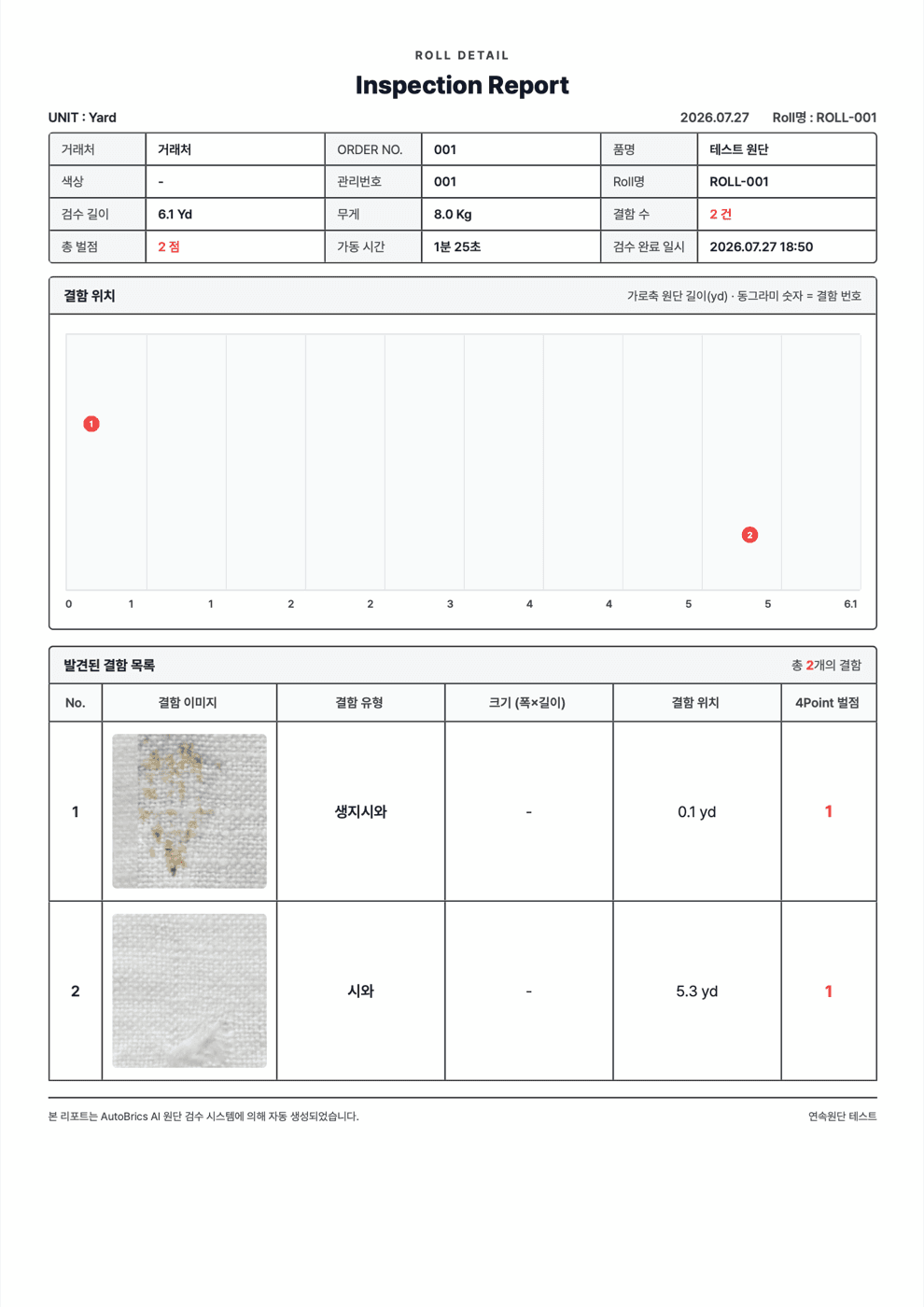
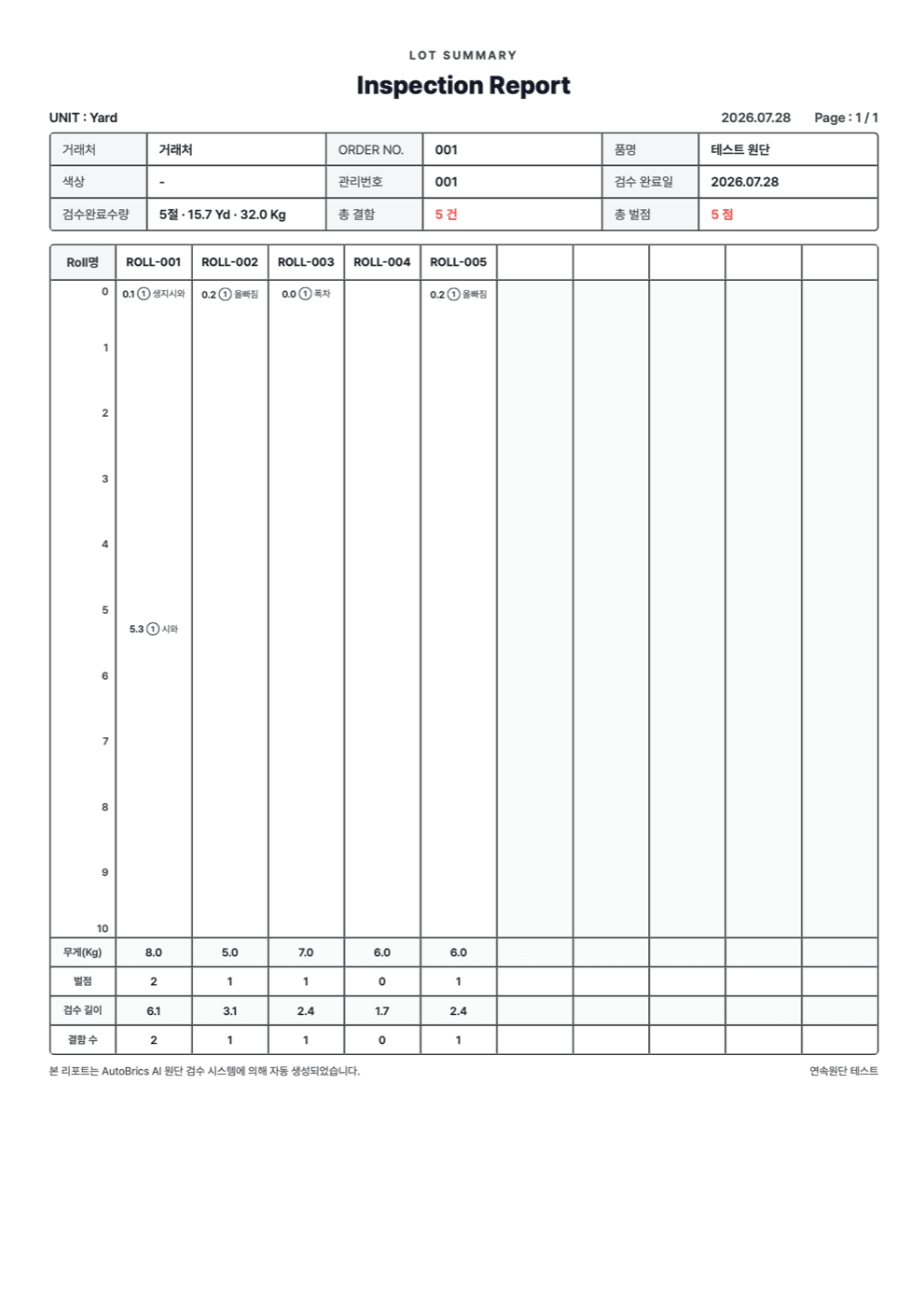
Each roll has a defect map, inspection results and 4-Point scores. Assessment criteria are confirmed for the material and buyer's requirements.
When a quality issue arises, use the roll's inspection records and defect images to review what was observed at inspection.
AutoCertificate organizes per-roll results and 4-Point scores into quality records. Confirm assessment criteria and report items for the material and buyer. The documents below are sample report templates.
Per-roll inspection records
Automatic 4-Point scoring
Create quality reports
Share and review records with buyers
About AutoLabs
Founded in 2025. We validate applications by material, starting from a working prototype for plain, single-color nonwovens, with a focus on Korea, Vietnam and Indonesia.

Chief Executive Officer

Chief Operating Officer

Chief Technology Officer
We develop our products and technology with investment from Antler and support from Google for Startups, NVIDIA Inception, Microsoft for Startups and TIPS.




Get in Touch
Tell us your material, working width, operating speed and the problem you want to solve. We'll suggest the next step.